





TikTok, the platform renowned for user-generated videos, is once again attracting attention with a novel and daring feature: users will soon be able to control the proportion of AI-generated content displayed in their For You feed.
- TikTok, the platform renowned for user-generated videos, is once again attracting attention with a novel and daring feature: users will...
- Envision adjusting a control to increase or decrease the output of AI-generated videos to your preference.
- Currently, AI-generated content is added to this inventory as an available option.
- This means TikTok isn’t removing AI content, but giving users the power to decide their level of exposure.
Keep reading for the full breakdown on AI content slider — everything you need to know is covered below.
Envision adjusting a control to increase or decrease the output of AI-generated videos to your preference. This development marks a significant shift in authority over the content disseminated on one of the world’s leading social media platforms.
Tailoring your TikTok feed: The AI content slider
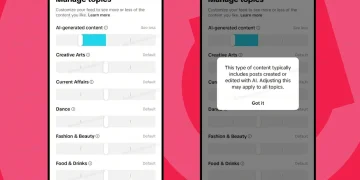
The new configuration is incorporated into TikTok’s “Manage Topics” feature, which already enables users to customise their feed by adjusting the frequency of content categories such as Dance, Sports, and Food & Drinks.



Currently, AI-generated content is added to this inventory as an available option. Users can toggle the proportion of AI-generated videos and images displayed in their feed, offering a level of personalised control previously unavailable.
Eyeing this update, TikTok said in their blog, “Manage Topics already enables people to adjust how often they see content related to over 10 categories. Like those controls, the AIGC setting is intended to help people tailor the diverse range of content in their feed, rather than removing or replacing content in feeds entirely”. This means TikTok isn’t removing AI content, but giving users the power to decide their level of exposure.
The change comes amid the growing presence of AI content on social media, where some AI videos range from creative to bizarre and even misleading. TikTok’s new filter lets users adjust AI levels to suit their tastes. Go to Settings > Content Preferences > Manage Topics and customise AI-generated content.
Other tech giants are also embracing AI content controls. Meta launched “Vibes,” an AI video feed, and OpenAI developed “Sora,” focusing on short AI-generated videos. But unlike AI-only feeds, TikTok’s approach emphasises user choice, blending AI content into a diverse mix.

This distinctive feature demonstrates TikTok’s dedication to user customisation and transparency regarding the role of AI in content curation. With this toggle, you control whether AI-generated content actively influences your feed or remains in the background.