





Android users no longer need to switch to a web browser to organise their inboxes; Google just rolled out a direct way to create Gmail labels right in the mobile app.
- Android users no longer need to switch to a web browser to organise their inboxes; Google just rolled out a...
- This change ends years of waiting for a feature that iOS and desktop Gmail users have enjoyed.
- Users can set up Gmail labels on Android in under a minute.
- You can easily select and remove labels without the need to switch,” notes coverage of the rollout.
Keep reading for the full breakdown on Android email organization — everything you need to know is covered below.
This change ends years of waiting for a feature that iOS and desktop Gmail users have enjoyed.
Gmail labels creation now native on Android
Open the navigation drawer in the Gmail app by tapping the hamburger menu in the top-left corner.
A new “Create label” option appears between “Manage subscriptions” and the existing labels, marked by a pill-shaped “New” tag and, sometimes, a circular badge on the button.
Tap it to enter a label name in the simple prompt, then save. Users can set up Gmail labels on Android in under a minute.

The rollout hits Gmail version 2026.01.26.x, but it activates on an account-by-account basis, so one email address on your device might show it while others do not.
Google first tested label creation, editing, and deletion in Gmail for Android version 2025.12.29.855765709 back in January, closing a gap that left Android behind iOS since at least 2019 and desktop for over a decade.
Now live for some, this lets people build custom Gmail labels on Android without leaving the app, matching tools on other platforms.
Manage and apply Gmail labels on Android easily
To delete or rename a label, head to Settings, pick your Gmail address, tap Notifications, then Manage labels, select one and hit delete or edit the name.
“You can just go to Settings > Gmail address > Notifications> Manage labels. You can easily select and remove labels without the need to switch,” notes coverage of the rollout.
Labels stay private to the account holder and do not show to recipients; deleting an email also clears it from the label.
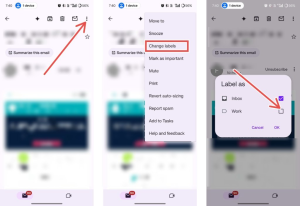
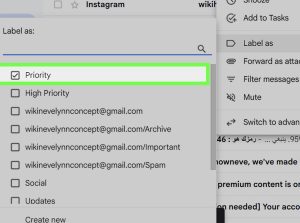
To apply Gmail labels on Android, long-press an email, tap the three-dot menu, choose “Label as,” select one or more labels, and tap OK.
This works across devices for enabled accounts, though no colour customisation exists yet on Android, unlike the web.
The update arrives as a server-side switch, so update the Gmail app and check your menu; Google has not detailed full availability timing.
Users report spotting it in version 2026.01.26.862970449. Release, with the option above, existing labels in the sidebar. Gmail labels on Android now support quick inbox sorting, letting you tag receipts or projects on the go.
For multi-account setups, enablement varies; one tester saw it on one of three accounts instantly across phones. This direct creation speeds workflows for millions of people who manage email on Android devices daily.
The feature pairs with existing tools like filters, helping tame high-volume inboxes without requiring a desktop. Google continues refining the app, following iOS parity on labels while addressing Android-specific gaps.